> ## Documentation Index
> Fetch the complete documentation index at: https://hub.stackone.com/llms.txt
> Use this file to discover all available pages before exploring further.

# Workday Calculated Fields

> To add calculated fields in Workday, follow these steps

<Warning>
  This guidance assumes that you have admin privileges for your Workday account.
</Warning>

## Add Workday Calculated Fields

<Steps>
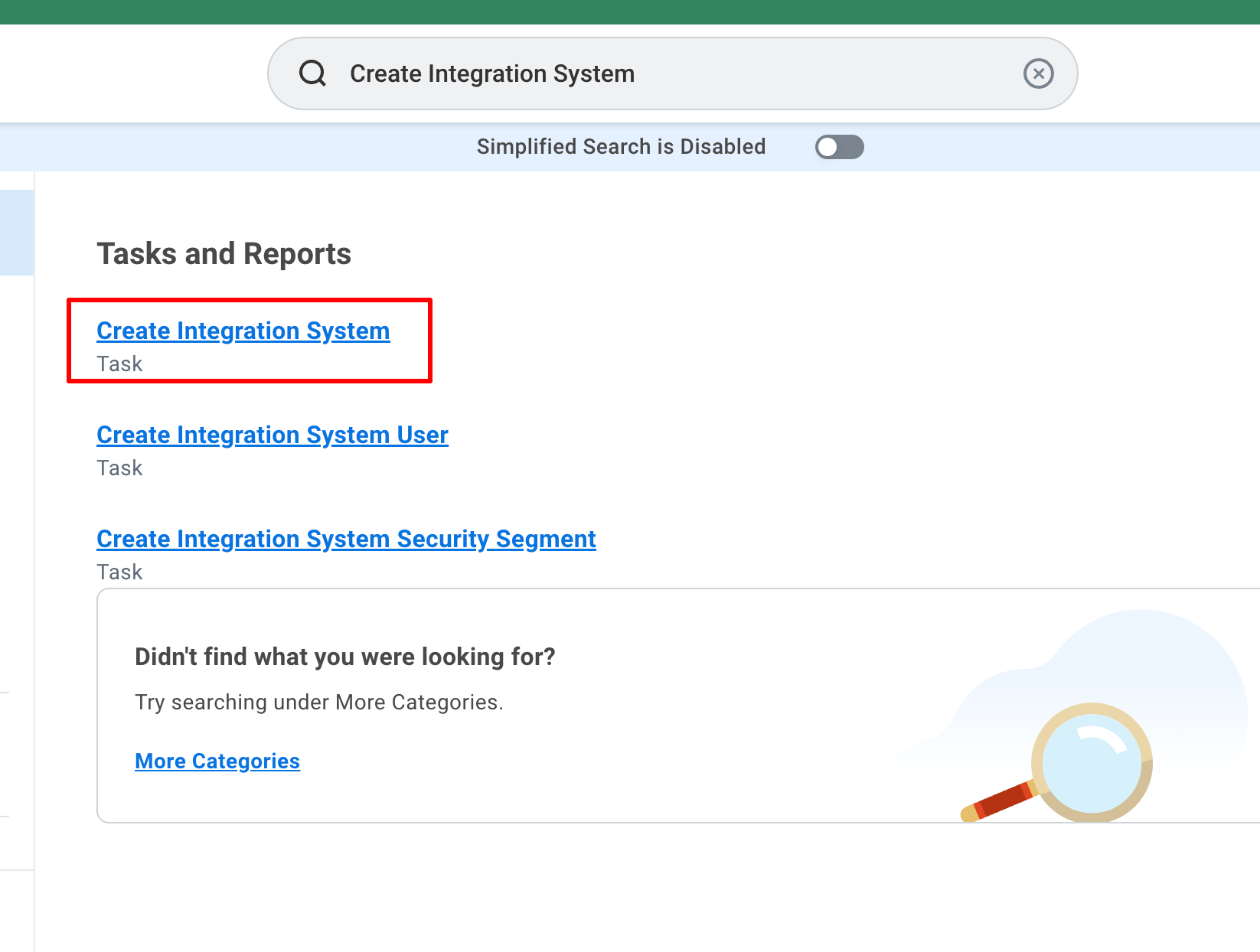
  <Step title="Search for 'Create Integration System'">
    Search for <b>Create Integration System</b> in the search bar and select it.

    <Frame>
      <img className="rounded-md" style={{ margin: '0 auto', border: '1px solid #efefef' }} alt="Search Create Custom Object" src="https://mintcdn.com/stackone-hub/0eLvz_3PPJtYMYiJ/images/workday/calculated-fields/image.png?fit=max&auto=format&n=0eLvz_3PPJtYMYiJ&q=85&s=124717cd33cfd97efab1b03b4372fb4a" width="1646" height="1244" data-path="images/workday/calculated-fields/image.png" />
    </Frame>
  </Step>

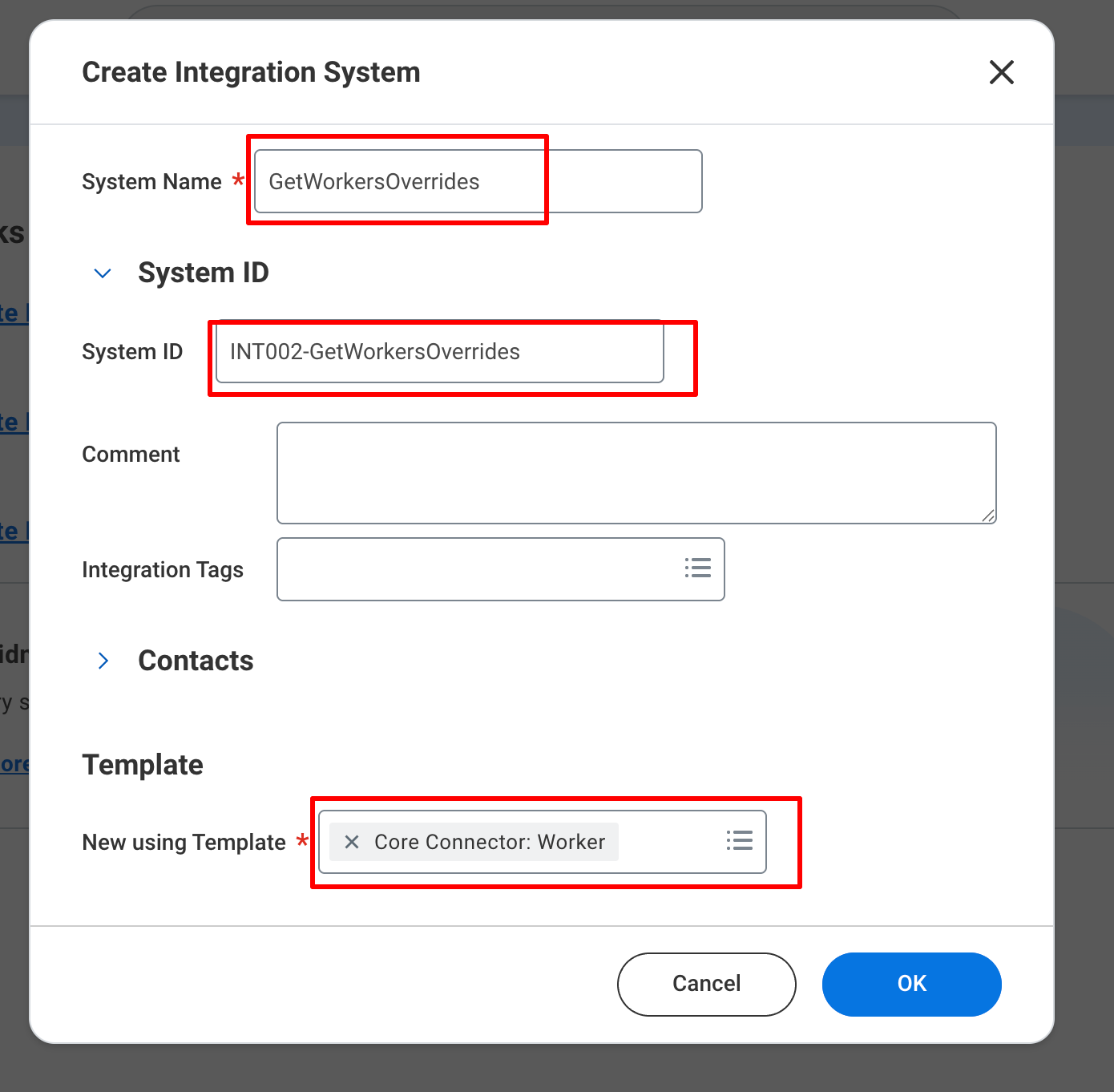
  <Step title="Create Integration System">
    Provide the <b>System Name</b>, <b>System ID</b> and select <b>Core Connector: Worker</b> in New Using Template and click <b>OK</b>.

    <Frame>
      <img className="rounded-md" style={{ margin: '0 auto', border: '1px solid #efefef' }} alt="Create Custom Object" src="https://mintcdn.com/stackone-hub/0eLvz_3PPJtYMYiJ/images/workday/calculated-fields/image1.png?fit=max&auto=format&n=0eLvz_3PPJtYMYiJ&q=85&s=f283552cf4af756b5c874a4154bd5527" width="1390" height="1362" data-path="images/workday/calculated-fields/image1.png" />
    </Frame>
  </Step>

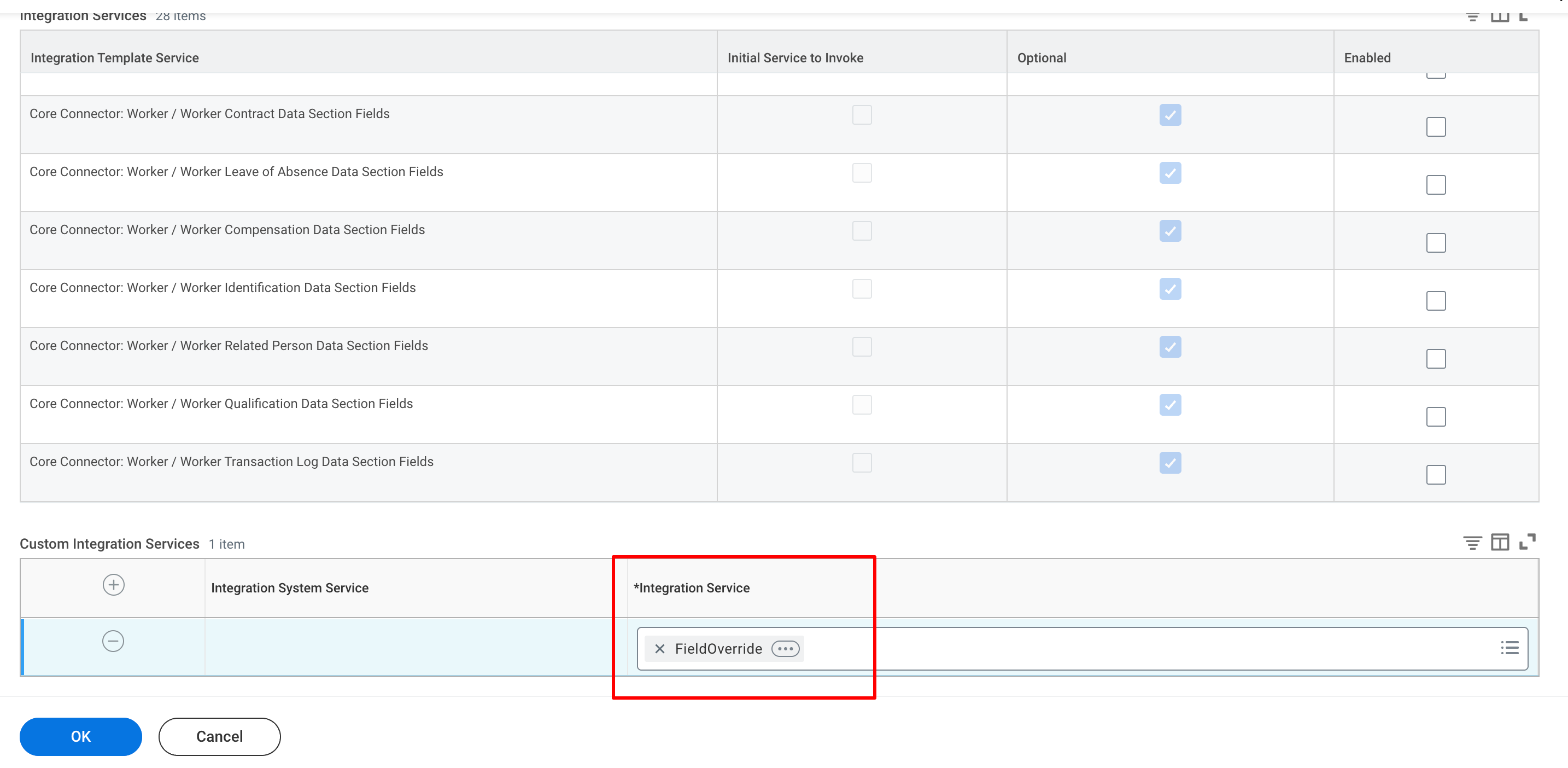
  <Step title="Select 'Integration Service'">
    Select the <b>Integration Service</b> in the Custom Integrations Services and click <b>OK</b>.

    <Frame>
      <img className="rounded-md" style={{ margin: '0 auto', border: '1px solid #efefef' }} alt="Click Field Definitions" src="https://mintcdn.com/stackone-hub/0eLvz_3PPJtYMYiJ/images/workday/calculated-fields/image2.png?fit=max&auto=format&n=0eLvz_3PPJtYMYiJ&q=85&s=72c64082ff1fb46d76db6cb2670539d8" width="2868" height="1404" data-path="images/workday/calculated-fields/image2.png" />
    </Frame>
  </Step>

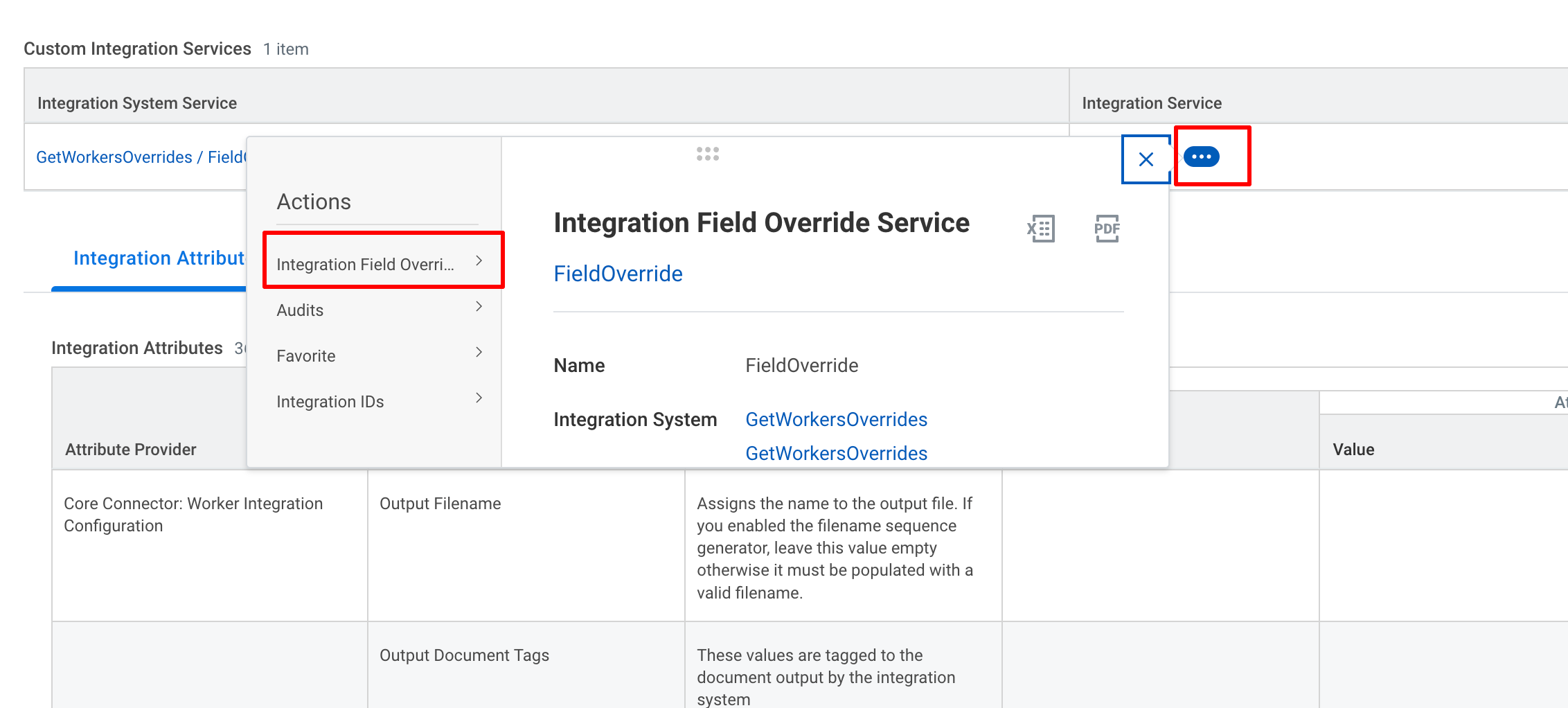
  <Step title="Add the 'Field Name' in the Servie">
    Click on <b>Actions</b> on the Integration Services and select <b>Integration Field Override</b> and click on <b>Edit</b>.

    <Frame>
      <img className="rounded-md" style={{ margin: '0 auto', border: '1px solid #efefef' }} alt="Click Field Definitions" src="https://mintcdn.com/stackone-hub/0eLvz_3PPJtYMYiJ/images/workday/calculated-fields/image3.png?fit=max&auto=format&n=0eLvz_3PPJtYMYiJ&q=85&s=3989396ae4f011927f262bf483f3f43b" width="2264" height="1022" data-path="images/workday/calculated-fields/image3.png" />
    </Frame>

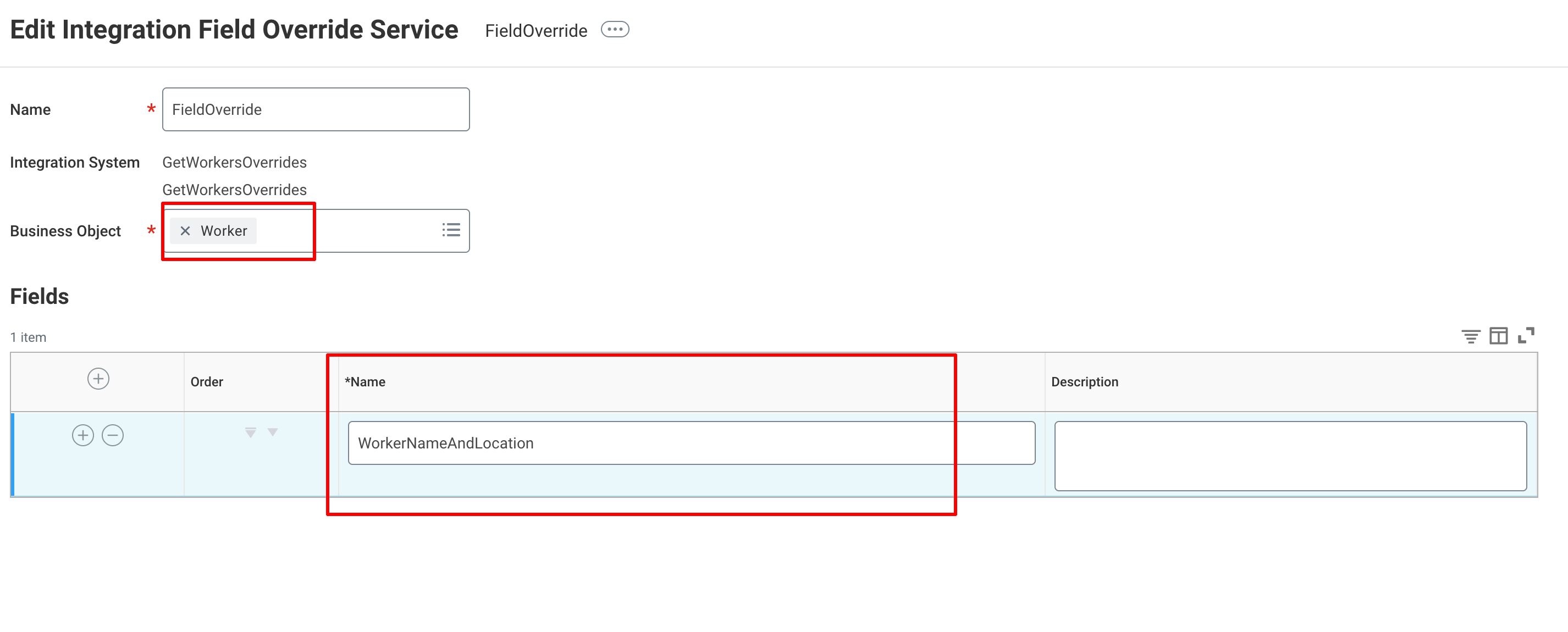
    Select the Business Object <b>Worker</b> and provide the Name of the field and click <b>OK</b> and <b>Done</b>.

    <Frame>
      <img className="rounded-md" style={{ margin: '0 auto', border: '1px solid #efefef' }} alt="Click Field Definitions" src="https://mintcdn.com/stackone-hub/0eLvz_3PPJtYMYiJ/images/workday/calculated-fields/image5.png?fit=max&auto=format&n=0eLvz_3PPJtYMYiJ&q=85&s=e278f89ff5ac970a66f443e0a8957ed7" width="2852" height="1150" data-path="images/workday/calculated-fields/image5.png" />
    </Frame>
  </Step>

  <Step title="Go to 'Integration Override Fields'">
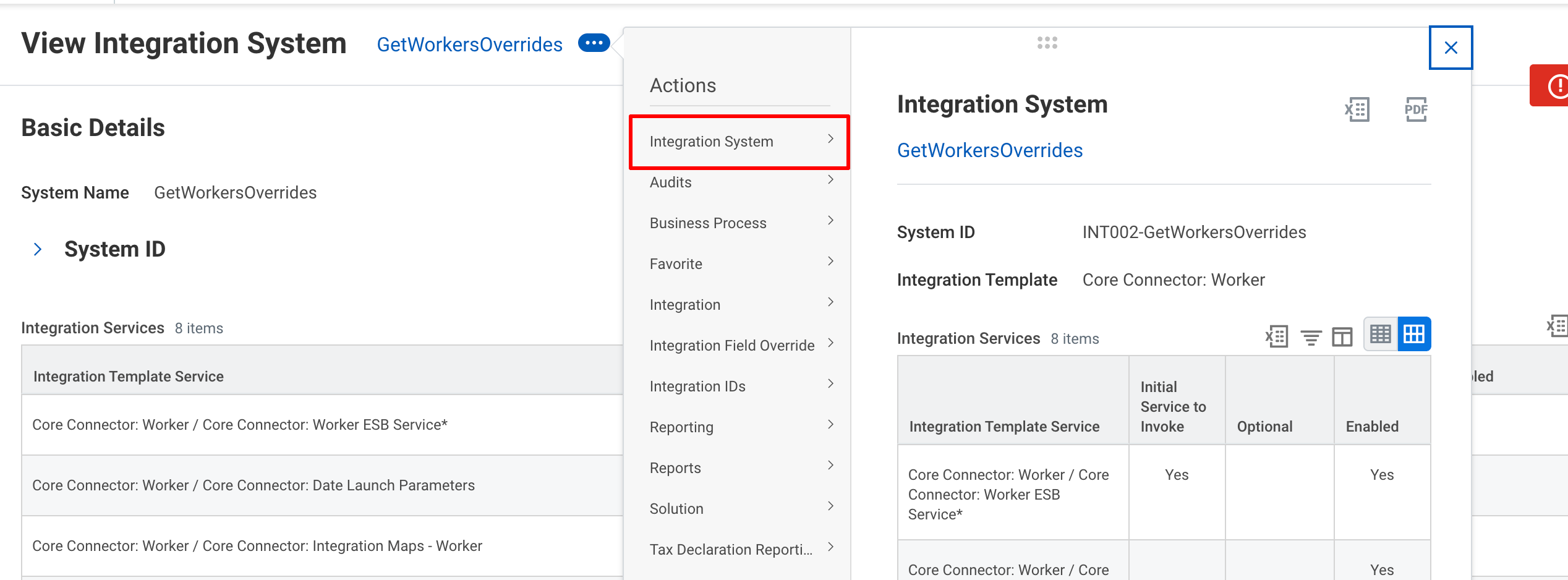
    Click the <b>Actions</b> button and select <b>Integration System</b> and select <b>Configure Integration Field Overrides</b>.

    <Frame>
      <img className="rounded-md" style={{ margin: '0 auto', border: '1px solid #efefef' }} alt="Click Add button" src="https://mintcdn.com/stackone-hub/0eLvz_3PPJtYMYiJ/images/workday/calculated-fields/image6.png?fit=max&auto=format&n=0eLvz_3PPJtYMYiJ&q=85&s=a43e8825a2f311be8e92cad1bd8c240a" width="2536" height="938" data-path="images/workday/calculated-fields/image6.png" />
    </Frame>
  </Step>

  <Step title="Select the Calculated Field">
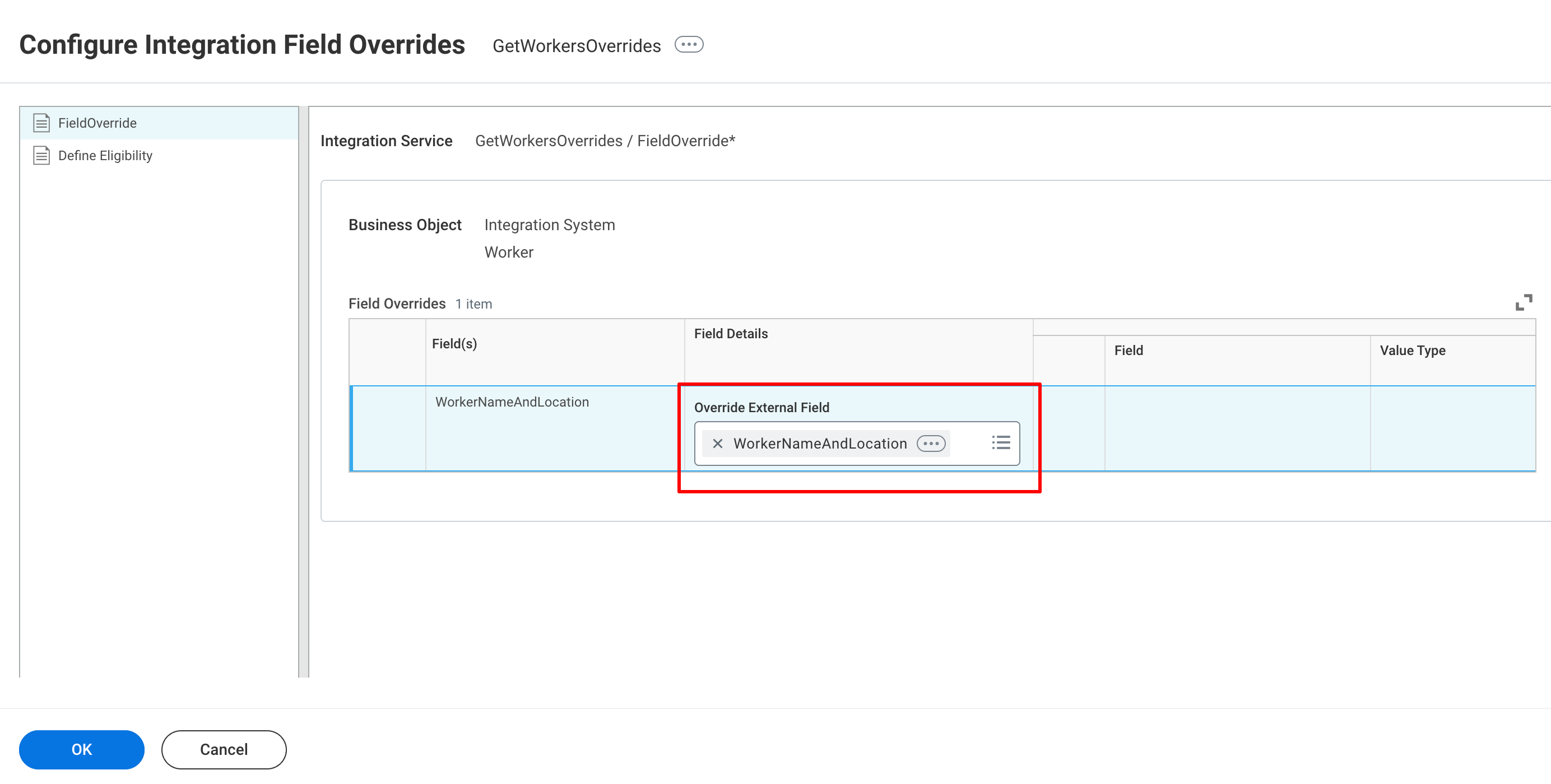
    Select the field to be overriden and click <b>OK</b> and then <b>Done</b>.

    <Frame>
      <img className="rounded-md" style={{ margin: '0 auto', border: '1px solid #efefef' }} alt="Enter Label & Field Type" src="https://mintcdn.com/stackone-hub/0eLvz_3PPJtYMYiJ/images/workday/calculated-fields/image7.png?fit=max&auto=format&n=0eLvz_3PPJtYMYiJ&q=85&s=4b0945c7b4d898d07359847d9ed1e9b5" width="2768" height="1400" data-path="images/workday/calculated-fields/image7.png" />
    </Frame>
  </Step>

  <Step title="Select the required 'Integration Attributes'">
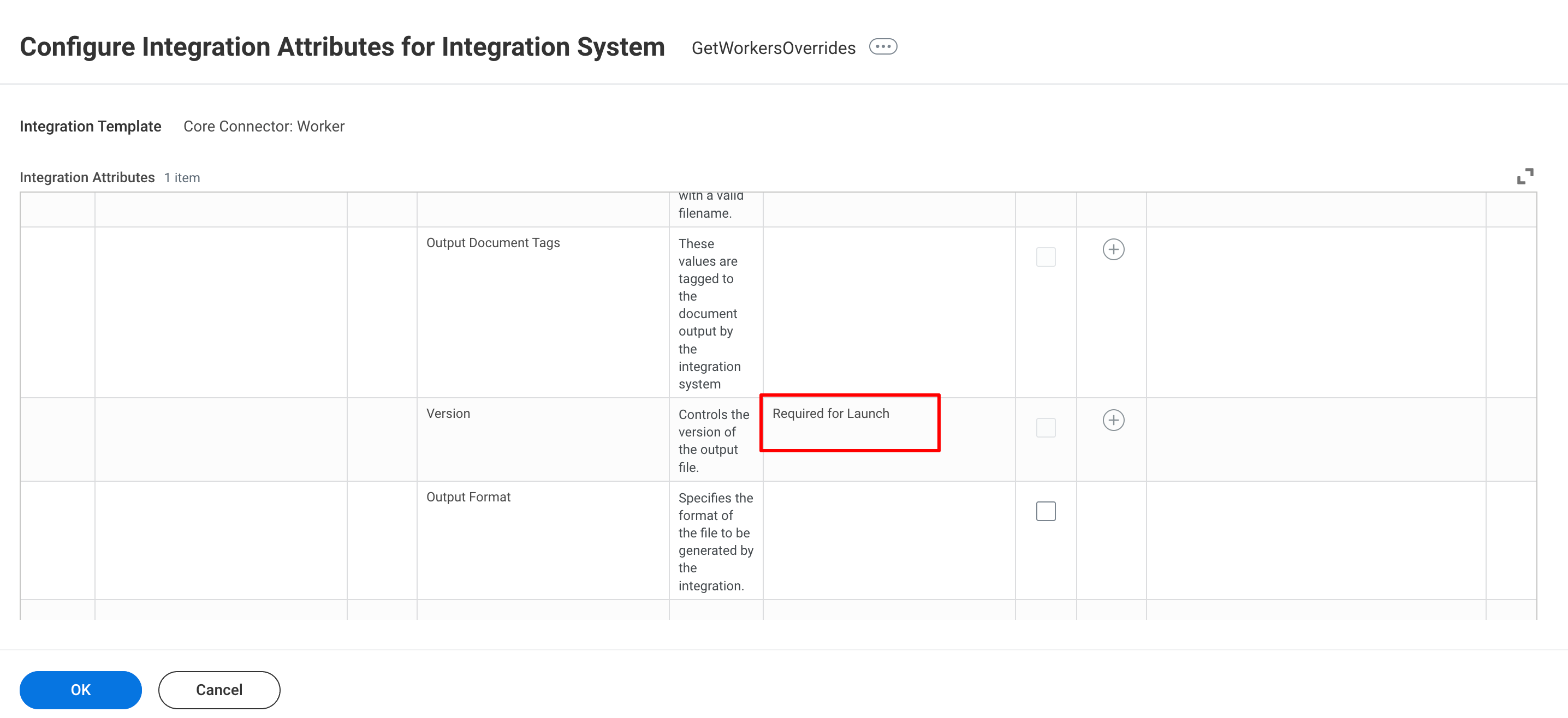
    Click the <b>Actions</b> button and select <b>Integration System</b> and select <b>Configure Integration Attributes</b>.
    From the given list provide values for all the attributes that are <b>Required for Launch</b> and click <b>OK</b>.

    <Frame>
      <img className="rounded-md" style={{ margin: '0 auto', border: '1px solid #efefef' }} alt="Click Add button" src="https://mintcdn.com/stackone-hub/0eLvz_3PPJtYMYiJ/images/workday/calculated-fields/image8.png?fit=max&auto=format&n=0eLvz_3PPJtYMYiJ&q=85&s=594f40c08792ad43454db0f482fe150a" width="2872" height="1316" data-path="images/workday/calculated-fields/image8.png" />
    </Frame>
  </Step>

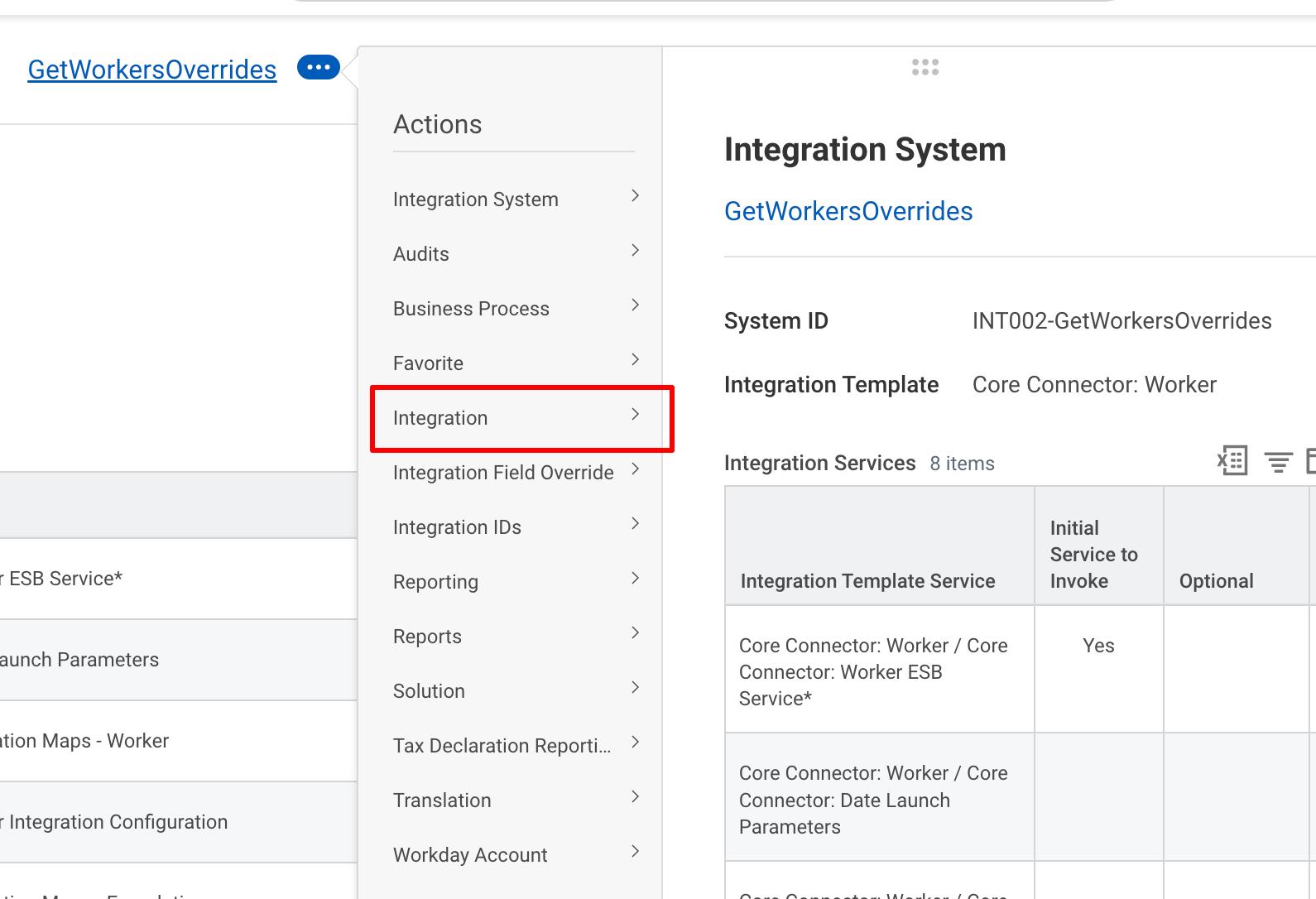
  <Step title="Run the Integration">
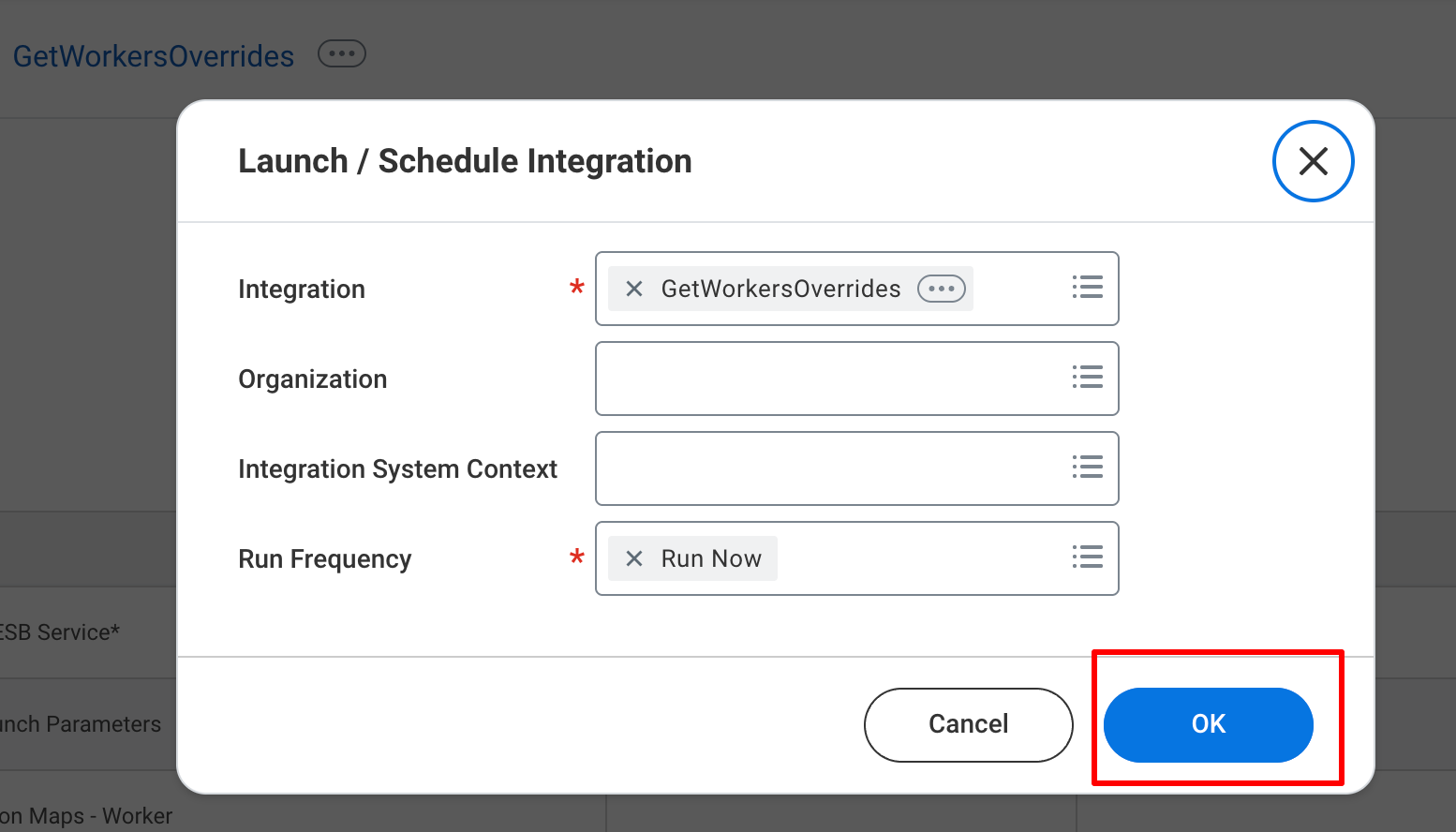
    Click the <b>Actions</b> button and select <b>Integration</b> and select <b>Launch/Schedule</b>.

    <Frame>
      <img className="rounded-md" style={{ margin: '0 auto', border: '1px solid #efefef' }} alt="Review and Confirm" src="https://mintcdn.com/stackone-hub/0eLvz_3PPJtYMYiJ/images/workday/calculated-fields/image9.png?fit=max&auto=format&n=0eLvz_3PPJtYMYiJ&q=85&s=79a5b3b407b1cc4c2a0ec2d97f599c6c" width="1590" height="1086" data-path="images/workday/calculated-fields/image9.png" />
    </Frame>

    Click <b>OK</b>.

    <Frame>
      <img className="rounded-md" style={{ margin: '0 auto', border: '1px solid #efefef' }} alt="Review and Confirm" src="https://mintcdn.com/stackone-hub/0eLvz_3PPJtYMYiJ/images/workday/calculated-fields/image10.png?fit=max&auto=format&n=0eLvz_3PPJtYMYiJ&q=85&s=7335fa69b3e752a2ba8d72f41de69045" width="1554" height="888" data-path="images/workday/calculated-fields/image10.png" />
    </Frame>

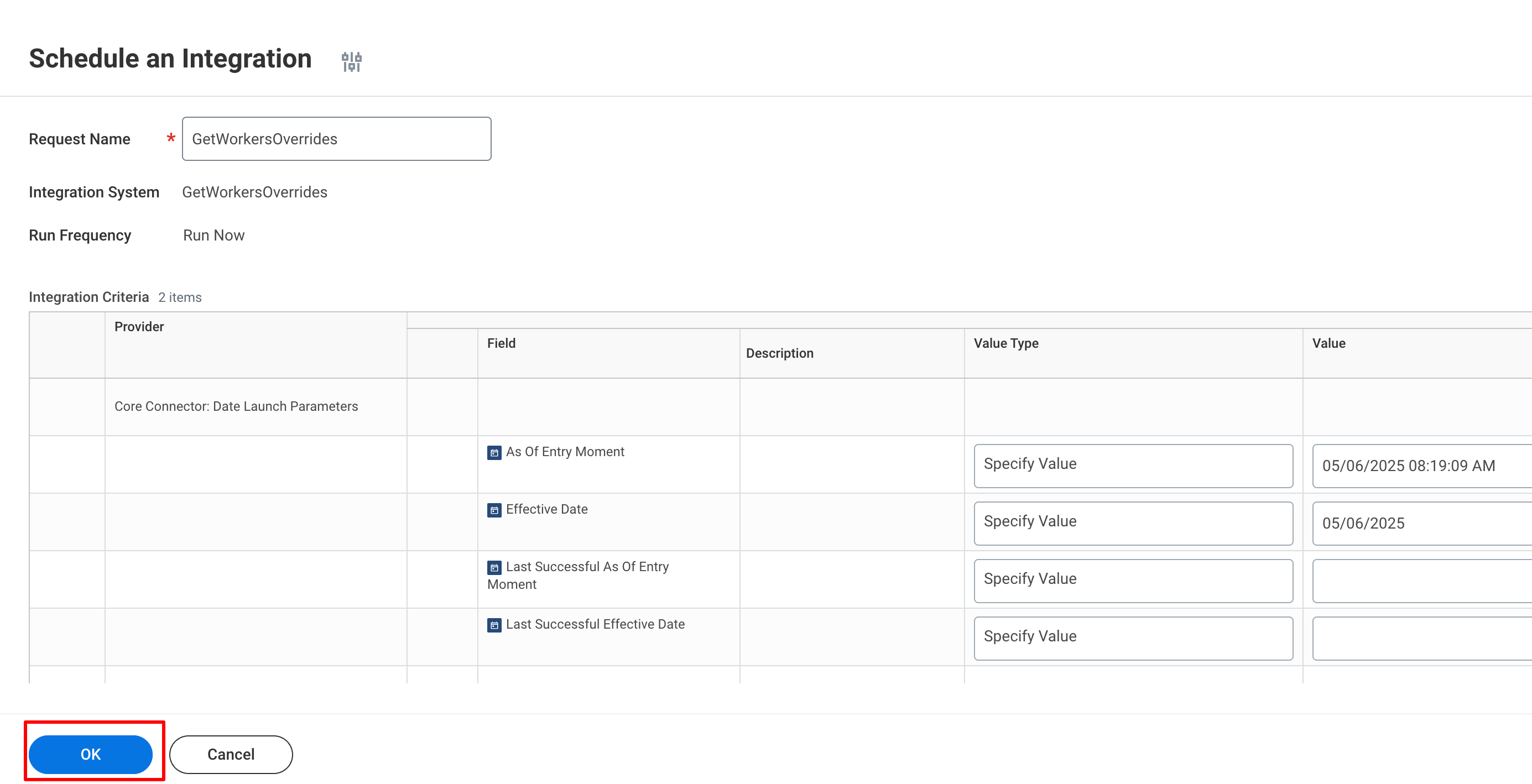
    Click <b>OK</b>.

    <Frame>
      <img className="rounded-md" style={{ margin: '0 auto', border: '1px solid #efefef' }} alt="Review and Confirm" src="https://mintcdn.com/stackone-hub/0eLvz_3PPJtYMYiJ/images/workday/calculated-fields/image11.png?fit=max&auto=format&n=0eLvz_3PPJtYMYiJ&q=85&s=6a73c5ad2263bd840006b964c69595be" width="2770" height="1418" data-path="images/workday/calculated-fields/image11.png" />
    </Frame>
  </Step>
</Steps>