> ## Documentation Index
> Fetch the complete documentation index at: https://hub.stackone.com/llms.txt
> Use this file to discover all available pages before exploring further.

# Bullhorn Assessment or Background Check

> To successfully send webhook notifications from Bullhorn, follow these steps in your Bullhorn account and complete the required actions.

## Send the assessment or background check invitation to the candidate

<Steps>
  <Step title="Select a Candidate from the Candidate List">
    Navigate to the <i>Candidate List</i> page and select a candidate.

    <Frame>
      <img className="rounded-md" style={{ margin: '0 auto', border: '1px solid #efefef' }} alt="Maintain Assessment Status" src="https://mintcdn.com/stackone-hub/SGcwO7dDAvc0Bumg/images/bullhorn-assessment-background-check/bullhorn-aab-1.png?fit=max&auto=format&n=SGcwO7dDAvc0Bumg&q=85&s=2a13c0c016d03ab111946ddb7cc970d7" width="1920" height="372" data-path="images/bullhorn-assessment-background-check/bullhorn-aab-1.png" />
    </Frame>

    Click on the candidate to open their application, then click on the `Assessment or Background Check` tab.

    <Frame>
      <img className="rounded-md" style={{ margin: '0 auto', border: '1px solid #efefef' }} alt="Maintain Assessment Status" src="https://mintcdn.com/stackone-hub/SGcwO7dDAvc0Bumg/images/bullhorn-assessment-background-check/bullhorn-aab-2.png?fit=max&auto=format&n=SGcwO7dDAvc0Bumg&q=85&s=55bf88d2da62891c0179d4dfc49b33e3" width="1920" height="275" data-path="images/bullhorn-assessment-background-check/bullhorn-aab-2.png" />
    </Frame>
  </Step>

  <Step title="Select test & send the notification">
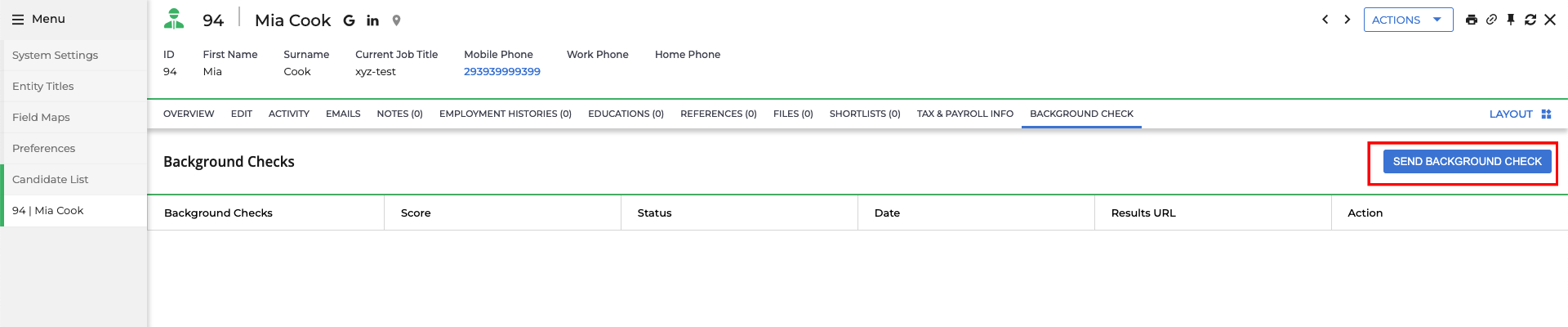
    Click the `Send Assessment or Background Check` button.
    <Frame>
      <img className="rounded-md" style={{ margin: '0 auto', border: '1px solid #efefef' }} alt="Edit/View Assessment/Background check Status ID" src="https://mintcdn.com/stackone-hub/SGcwO7dDAvc0Bumg/images/bullhorn-assessment-background-check/bullhorn-aab-3.png?fit=max&auto=format&n=SGcwO7dDAvc0Bumg&q=85&s=9477040c8daf46e970befb13a47d1e0f" width="1920" height="400" data-path="images/bullhorn-assessment-background-check/bullhorn-aab-3.png" />
    </Frame>

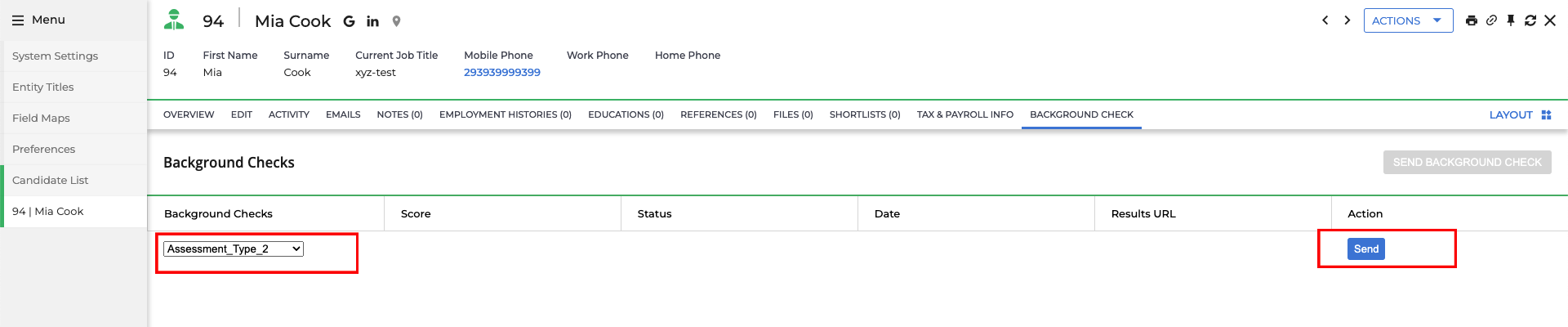
    A row will appear to select the assessment or background check.

    <Frame>
      <img className="rounded-md" style={{ margin: '0 auto', border: '1px solid #efefef' }} alt="Edit/View Assessment/Background check Status ID" src="https://mintcdn.com/stackone-hub/SGcwO7dDAvc0Bumg/images/bullhorn-assessment-background-check/bullhorn-aab-4.png?fit=max&auto=format&n=SGcwO7dDAvc0Bumg&q=85&s=b9264da5c57c45e39264f54ee4d0b9ce" width="1920" height="370" data-path="images/bullhorn-assessment-background-check/bullhorn-aab-4.png" />
    </Frame>

    Select the test and click the `Send` button to dispatch the notification.
    <Frame>
      <img className="rounded-md" style={{ margin: '0 auto', border: '1px solid #efefef' }} alt="Edit/View Assessment/Background check Status ID" src="https://mintcdn.com/stackone-hub/SGcwO7dDAvc0Bumg/images/bullhorn-assessment-background-check/bullhorn-aab-5.png?fit=max&auto=format&n=SGcwO7dDAvc0Bumg&q=85&s=a7af311e15aeb4d3802a301b7fa228ce" width="1920" height="400" data-path="images/bullhorn-assessment-background-check/bullhorn-aab-5.png" />
    </Frame>

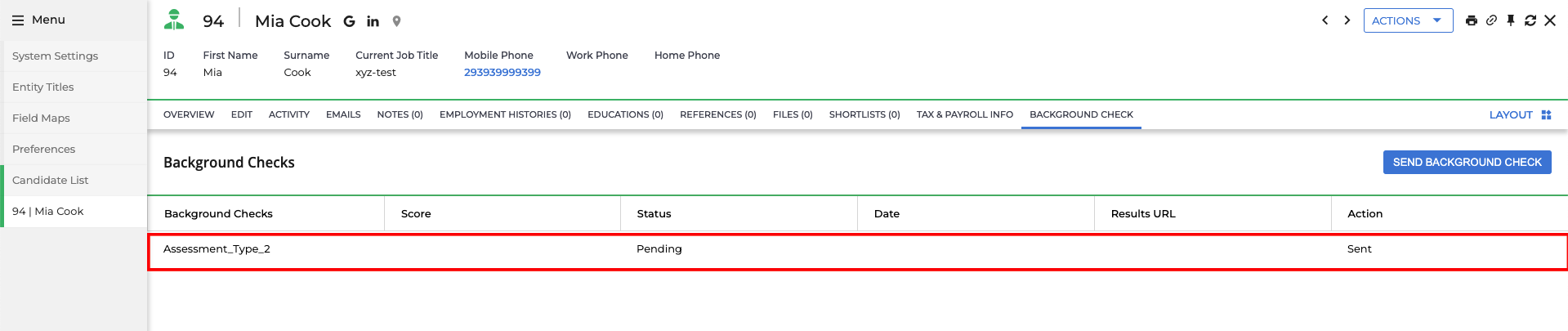
    Once the assessment or background check notification is sent successfully, a record will be updated with a `Pending` status.
    <Frame>
      <img className="rounded-md" style={{ margin: '0 auto', border: '1px solid #efefef' }} alt="Edit/View Assessment/Background check Status ID" src="https://mintcdn.com/stackone-hub/SGcwO7dDAvc0Bumg/images/bullhorn-assessment-background-check/bullhorn-aab-6.png?fit=max&auto=format&n=SGcwO7dDAvc0Bumg&q=85&s=f932199a20fa0d2fb670a1d1efce10f7" width="1919" height="405" data-path="images/bullhorn-assessment-background-check/bullhorn-aab-6.png" />
    </Frame>
  </Step>
</Steps>

## Check the updated result of the candidate's assessment or background check invitation

<Steps>
  <Step title="See the updated results of the assessment or background check">
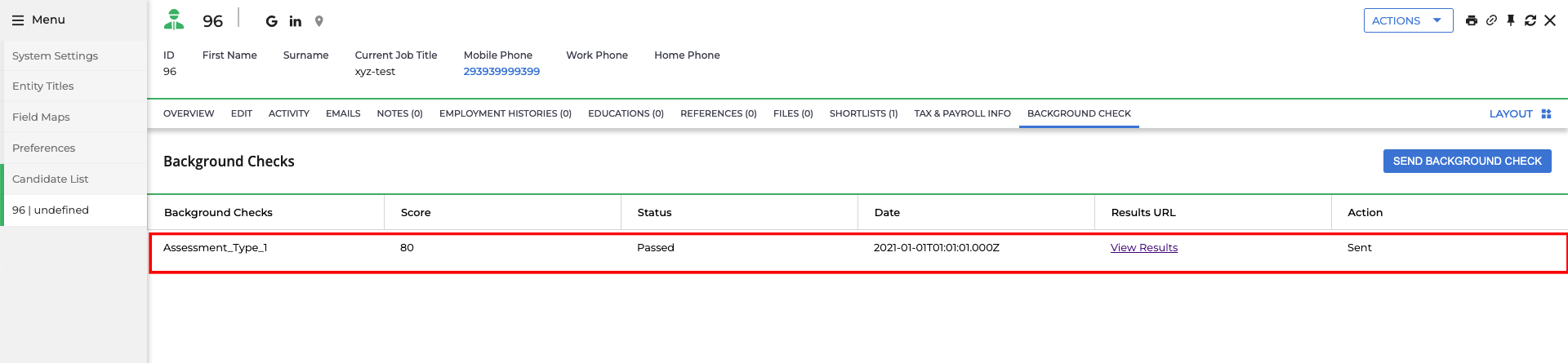
    Click on the candidate's name to view their application. When the candidate has completed the assessment or background check, you will see the updated results along with the score from the test.
    <Frame>
      <img className="rounded-md" style={{ margin: '0 auto', border: '1px solid #efefef' }} alt="View Assessment/Background check Updated Results" src="https://mintcdn.com/stackone-hub/SGcwO7dDAvc0Bumg/images/bullhorn-assessment-background-check/bullhorn-aab-7.png?fit=max&auto=format&n=SGcwO7dDAvc0Bumg&q=85&s=27a3ef555f1effcb37df080835555818" width="1920" height="445" data-path="images/bullhorn-assessment-background-check/bullhorn-aab-7.png" />
    </Frame>
  </Step>
</Steps>

## Useful Links

<Card title="API Reference" icon="link" href="https://bullhorn.github.io/rest-api-docs/">
  [https://bullhorn.github.io/rest-api-docs/](https://bullhorn.github.io/rest-api-docs/)
</Card>
