> ## Documentation Index
> Fetch the complete documentation index at: https://hub.stackone.com/llms.txt
> Use this file to discover all available pages before exploring further.

# Airship

> Follow these steps to connect Airship with StackOne Hub successfully.

<Warning>
  Ensure you have Admin privileges for your Airship account.
</Warning>

If you've been directed to StackOne to integrate with Airship, the following steps will help you understand the process and any necessary actions to configure successful integration.

## Find your Airship region (EU or US)

<Steps>
  <Step title="Login to Airship">
    Login to your Airship tenant.

    Check your browser's URL bar. The URL will indicate which region you are on:
    `https://go.urbanairship.com` - US
    `https://go.airship.eu/` - EU

    <Frame>
      <img className="rounded-md" style={{ margin: '0 auto', border: '1px solid #efefef' }} alt="Airship Region" src="https://mintcdn.com/stackone-hub/4kCYyCeuh-KQSMdC/images/airship/image1.png?fit=max&auto=format&n=4kCYyCeuh-KQSMdC&q=85&s=a7d376215bd6dc871c8dd1cae5730c84" width="229" height="45" data-path="images/airship/image1.png" />
    </Frame>
  </Step>
</Steps>

## Retrieve your App Key

<Steps>
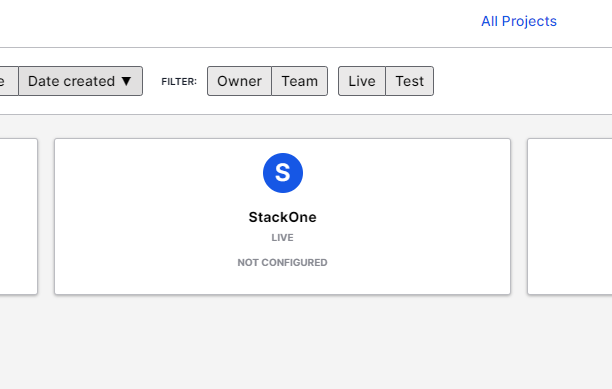
  <Step title="Select Project">
    Select the project you want to connect.
    <Frame>
      <img className="rounded-md" style={{ margin: '0 auto', border: '1px solid #efefef' }} alt="Select Project" src="https://mintcdn.com/stackone-hub/4kCYyCeuh-KQSMdC/images/airship/image2.png?fit=max&auto=format&n=4kCYyCeuh-KQSMdC&q=85&s=136b9a2fe27f63b3725748bdf8865e5f" width="612" height="389" data-path="images/airship/image2.png" />
    </Frame>
  </Step>

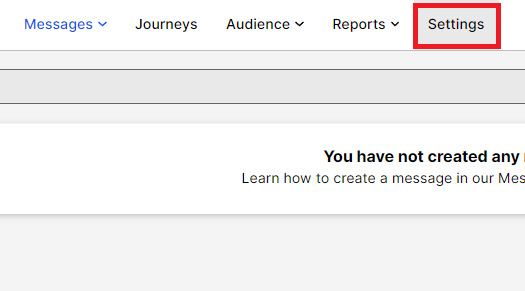
  <Step title="Select Settings">
    Select Settings.

    <Frame>
      <img className="rounded-md" style={{ margin: '0 auto', border: '1px solid #efefef' }} alt="Select Settings" src="https://mintcdn.com/stackone-hub/4kCYyCeuh-KQSMdC/images/airship/image3.png?fit=max&auto=format&n=4kCYyCeuh-KQSMdC&q=85&s=a3eb8da8a68407ec75f42542b83e5f43" width="525" height="291" data-path="images/airship/image3.png" />
    </Frame>
  </Step>

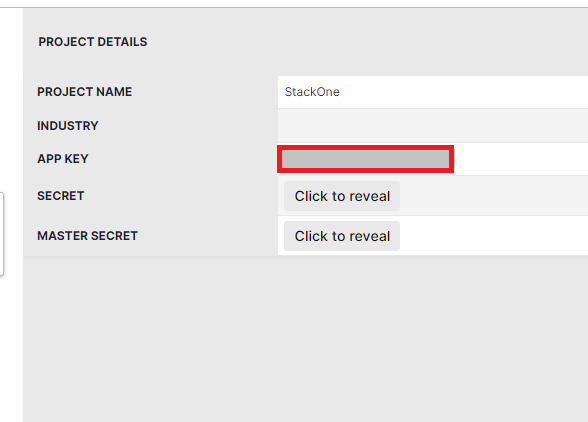
  <Step title="Copy App Key">
    Within Project Details on the right side, copy the App Key.
    <Frame>
      <img className="rounded-md" style={{ margin: '0 auto', border: '1px solid #efefef' }} alt="App Key" src="https://mintcdn.com/stackone-hub/4kCYyCeuh-KQSMdC/images/airship/image4.png?fit=max&auto=format&n=4kCYyCeuh-KQSMdC&q=85&s=bb8fb707a049baeb78be425414e7cbfa" width="588" height="422" data-path="images/airship/image4.png" />
    </Frame>
  </Step>
</Steps>

## Retrieve your Master Secret

<Steps>
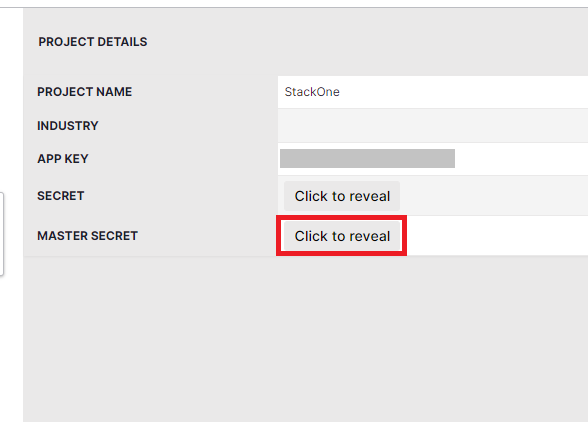
  <Step title="Reveal Master Secret">
    Within the Project Details panel, select "Click to reveal" next to Master Secret.
    <Frame>
      <img className="rounded-md" style={{ margin: '0 auto', border: '1px solid #efefef' }} alt="Reveal Master Secret" src="https://mintcdn.com/stackone-hub/4kCYyCeuh-KQSMdC/images/airship/image5.png?fit=max&auto=format&n=4kCYyCeuh-KQSMdC&q=85&s=a1c88299a3874bbc8956a23eb8eb5212" width="588" height="422" data-path="images/airship/image5.png" />
    </Frame>
  </Step>

  <Step title="Copy Master Secret">
    Copy the contents of Master Secret.
  </Step>
</Steps>

## Input the collected inputs into the StackOne hub

<Steps>
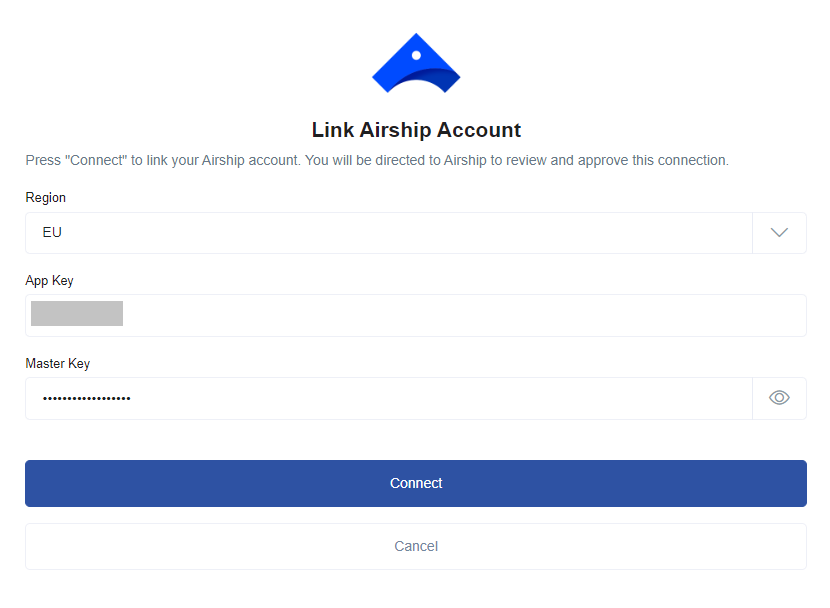
  <Step title="Enter the Details">
    On the link account page, enter the details you have collected and click the `Connect` button.
    <Frame>
      <img className="rounded-md" style={{ margin: '0 auto', border: '1px solid #efefef' }} alt="Link Account" src="https://mintcdn.com/stackone-hub/4kCYyCeuh-KQSMdC/images/airship/image6.png?fit=max&auto=format&n=4kCYyCeuh-KQSMdC&q=85&s=cdca21b4dd493cc3aac61231f2ad167a" width="830" height="608" data-path="images/airship/image6.png" />
    </Frame>
  </Step>
</Steps>