> ## Documentation Index
> Fetch the complete documentation index at: https://hub.stackone.com/llms.txt
> Use this file to discover all available pages before exploring further.

# Leapsome

> Follow these steps to connect Leapsome via the StackOne Hub successfully.

<Warning>
  Ensure you have Admin privileges for your Leapsome account.
</Warning>

If you've been directed to StackOne to integrate with Leapsome, the following steps will help you understand the process and any necessary actions to configure successful integration.

## Get your Leapsome API Secret

<Steps>
  <Step title="Log in to Leapsome">
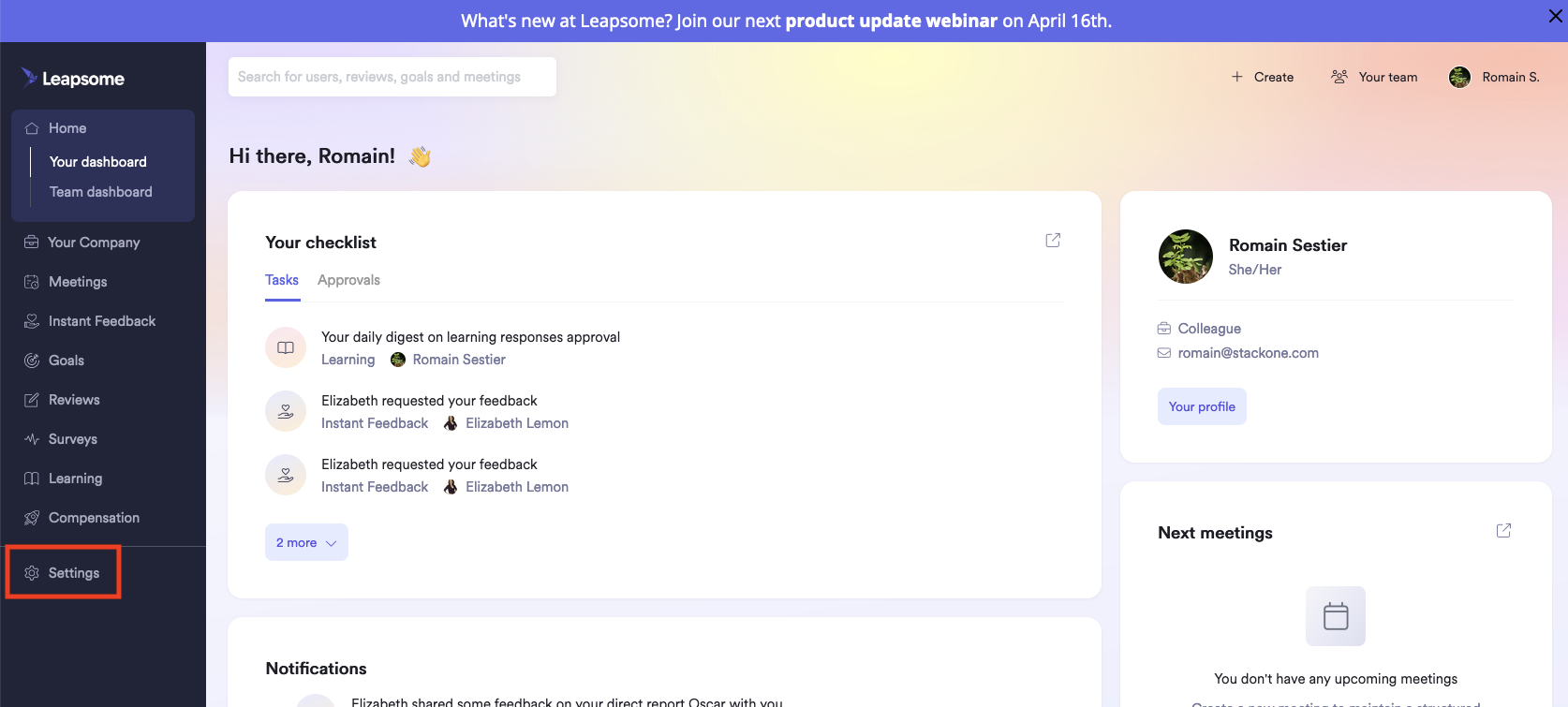
    After logging in to [Leapsome](https://www.leapsome.com), click Settings in the left navigation panel.
    <Frame>
      <img className="rounded-md" style={{ margin: '0 auto', border: '1px solid #efefef' }} alt="Settings" src="https://mintcdn.com/stackone-hub/7ld9431D4vubUUqN/images/leapsome/image1.png?fit=max&auto=format&n=7ld9431D4vubUUqN&q=85&s=8725089fc599d32a7b94b34d9f37675b" width="1674" height="755" data-path="images/leapsome/image1.png" />
    </Frame>
  </Step>

  <Step title="Navigate to Integrations">
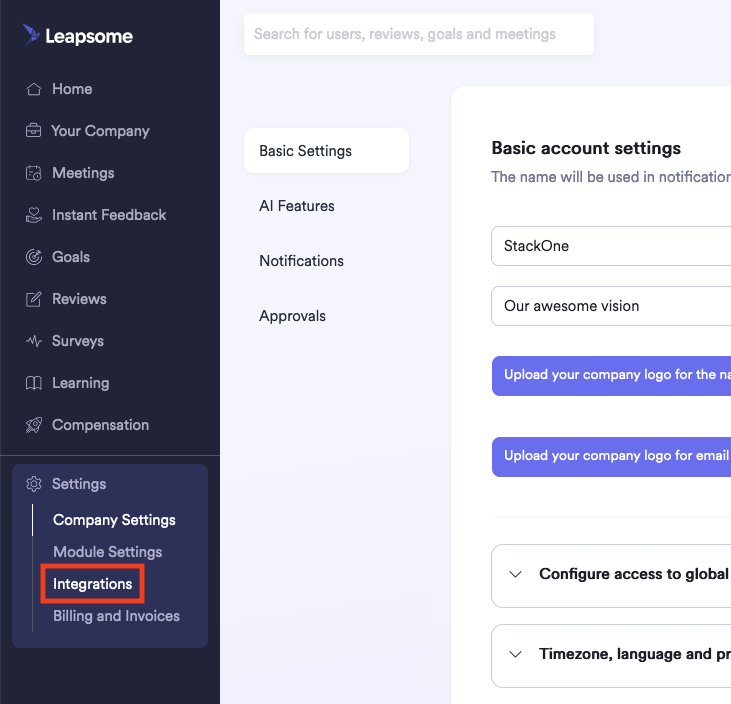
    Click Settings > Integrations in the left navigation panel.
    <Frame>
      <img className="rounded-md" style={{ margin: '0 auto', border: '1px solid #efefef' }} alt="Integrations" src="https://mintcdn.com/stackone-hub/7ld9431D4vubUUqN/images/leapsome/image2.png?fit=max&auto=format&n=7ld9431D4vubUUqN&q=85&s=e92cb4e2d87eb3e852e3bdd7b3892045" width="731" height="704" data-path="images/leapsome/image2.png" />
    </Frame>
  </Step>

  <Step title="Access API">
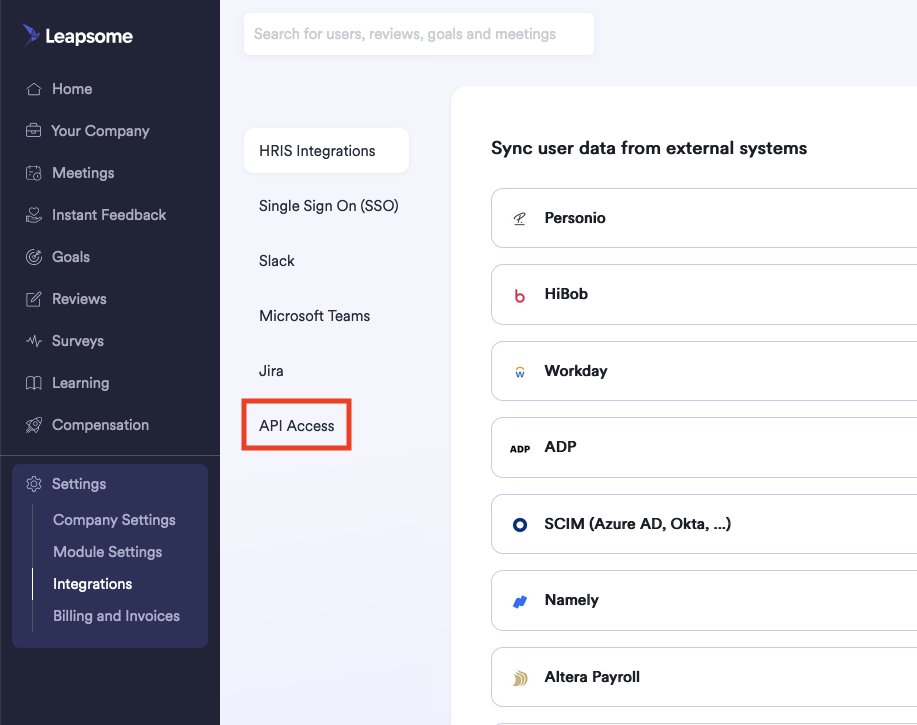
    Click API Access in the page that appears.
    <Frame>
      <img className="rounded-md" style={{ margin: '0 auto', border: '1px solid #efefef' }} alt="API Access" src="https://mintcdn.com/stackone-hub/7ld9431D4vubUUqN/images/leapsome/image3.png?fit=max&auto=format&n=7ld9431D4vubUUqN&q=85&s=8cc6ebcd97e0260dc51024c14496df0e" width="917" height="725" data-path="images/leapsome/image3.png" />
    </Frame>
  </Step>

  <Step title="Copy API Secret">
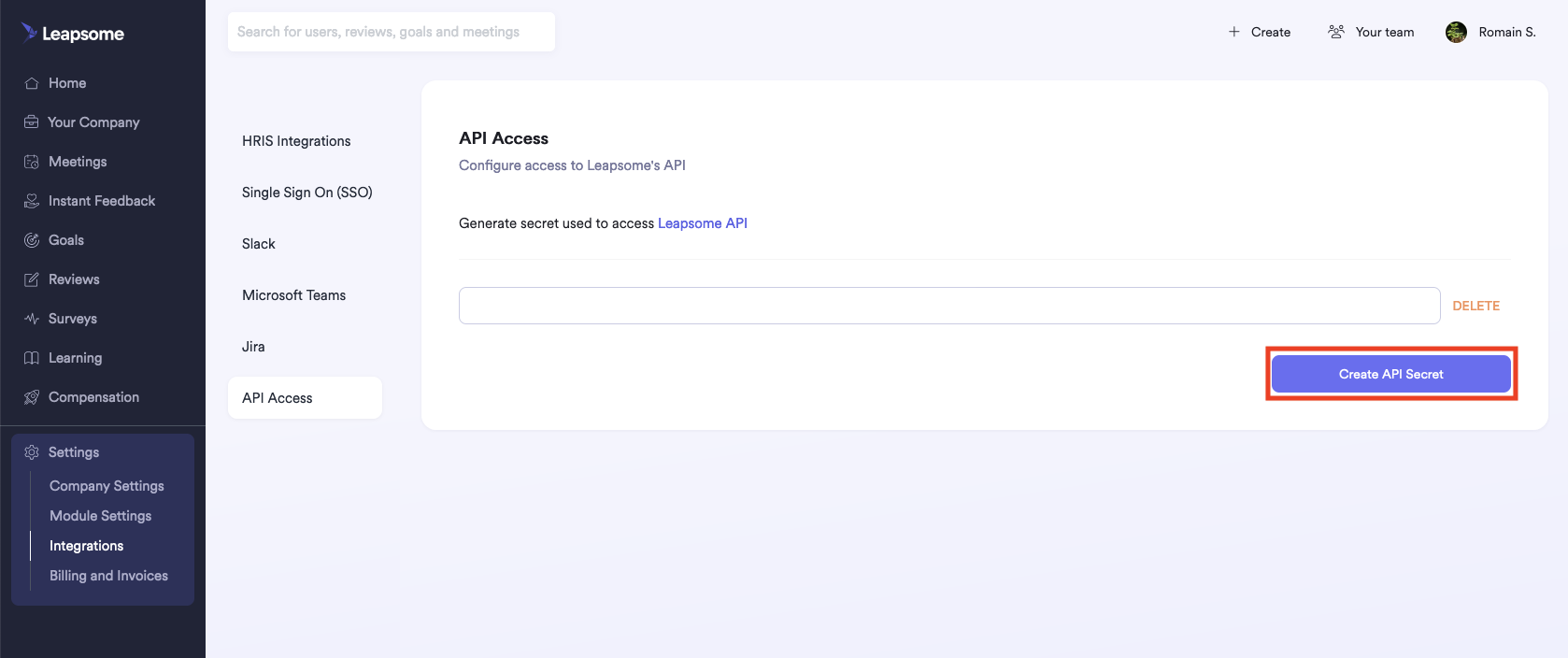
    Copy the displayed API Secret and store it safely. If one does not yet exist, first click the Create API Secret button.
    <Frame>
      <img className="rounded-md" style={{ margin: '0 auto', border: '1px solid #efefef' }} alt="API Secret" src="https://mintcdn.com/stackone-hub/7ld9431D4vubUUqN/images/leapsome/image4.png?fit=max&auto=format&n=7ld9431D4vubUUqN&q=85&s=9800b28f7cbe15248fd810e64267d1ff" width="1678" height="704" data-path="images/leapsome/image4.png" />
    </Frame>
  </Step>
</Steps>

## Get your Leapsome SCIM Token

<Steps>
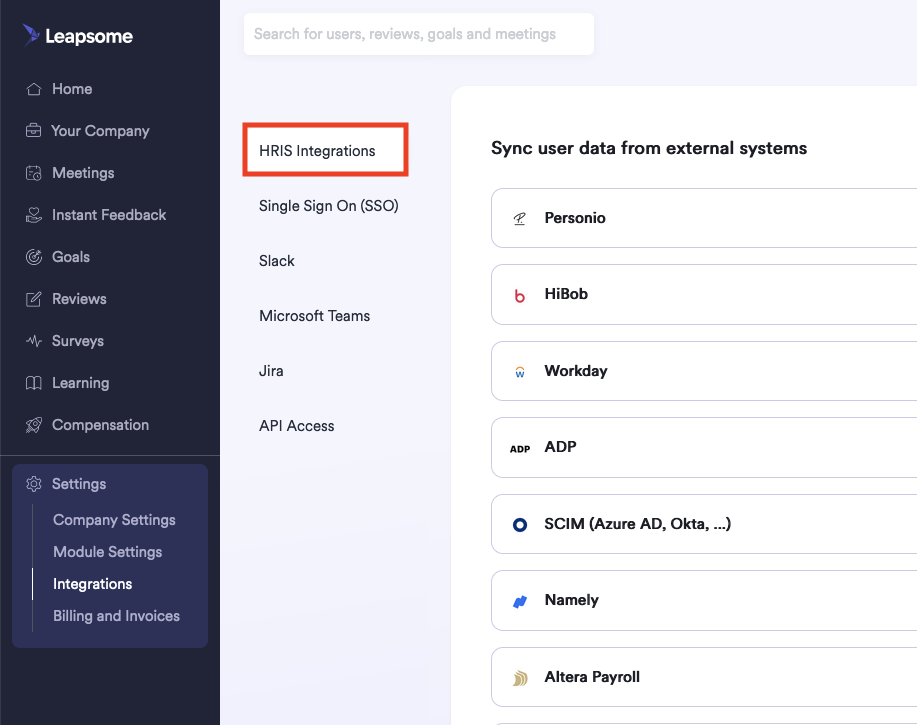
  <Step title="Navigate to HRIS Integrations">
    Within the Settings > Integrations page, click HRIS Integrations.
    <Frame>
      <img className="rounded-md" style={{ margin: '0 auto', border: '1px solid #efefef' }} alt="HRIS Integrations" src="https://mintcdn.com/stackone-hub/7ld9431D4vubUUqN/images/leapsome/image5.png?fit=max&auto=format&n=7ld9431D4vubUUqN&q=85&s=980b9ad03764a69fd8ed9504f69306e1" width="917" height="725" data-path="images/leapsome/image5.png" />
    </Frame>
  </Step>

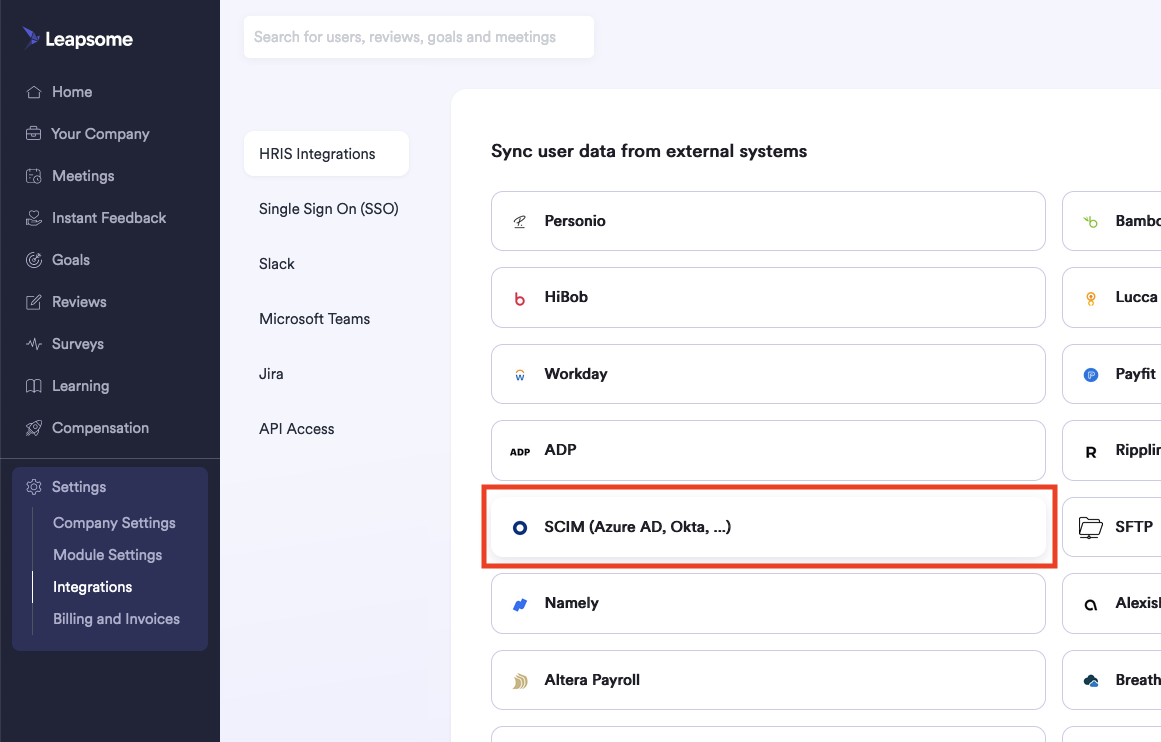
  <Step title="Select SCIM Integration">
    From the displayed tiles, click the tile named SCIM (Azure AD, Okta, ... ).
    <Frame>
      <img className="rounded-md" style={{ margin: '0 auto', border: '1px solid #efefef' }} alt="SCIM Integration" src="https://mintcdn.com/stackone-hub/7ld9431D4vubUUqN/images/leapsome/image6.png?fit=max&auto=format&n=7ld9431D4vubUUqN&q=85&s=2226292c5bf3fa458c6df5d9f509e907" width="1161" height="742" data-path="images/leapsome/image6.png" />
    </Frame>
  </Step>

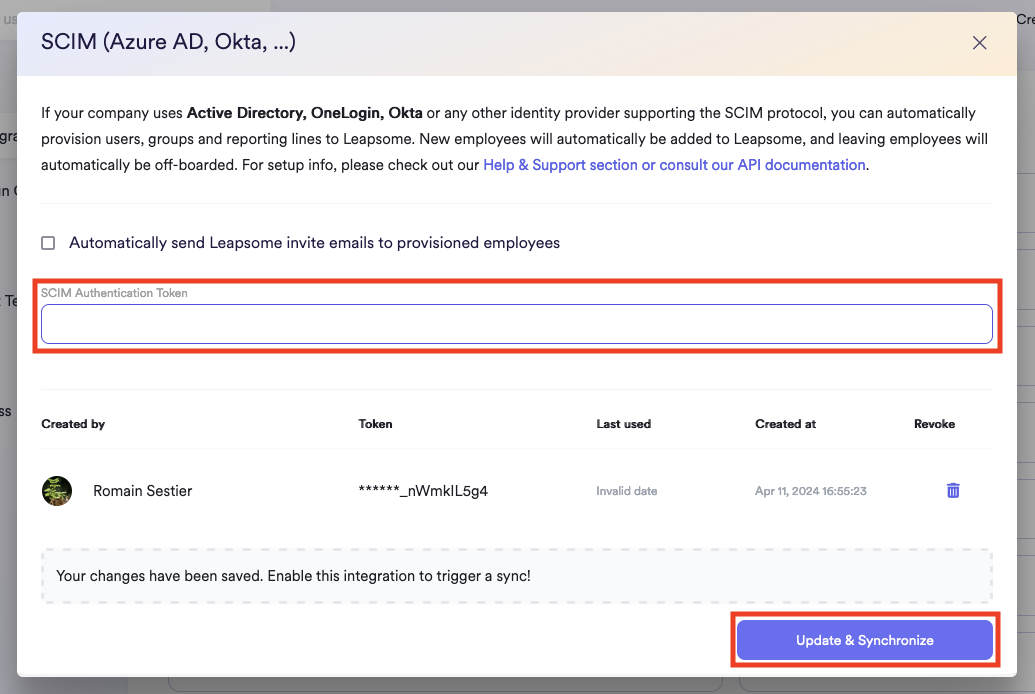
  <Step title="Copy SCIM Authentication Token">
    In the window that appears, copy the displayed SCIM Authentication Token and store it safely. If one does not yet exist, click the Update & Synchronize button.
    <Frame>
      <img className="rounded-md" style={{ margin: '0 auto', border: '1px solid #efefef' }} alt="SCIM Authentication Token" src="https://mintcdn.com/stackone-hub/7ld9431D4vubUUqN/images/leapsome/image7.png?fit=max&auto=format&n=7ld9431D4vubUUqN&q=85&s=07b67007a3355761f07a144c18b4aa0c" width="1035" height="694" data-path="images/leapsome/image7.png" />
    </Frame>
  </Step>
</Steps>

## Connecting to StackOne

<Steps>
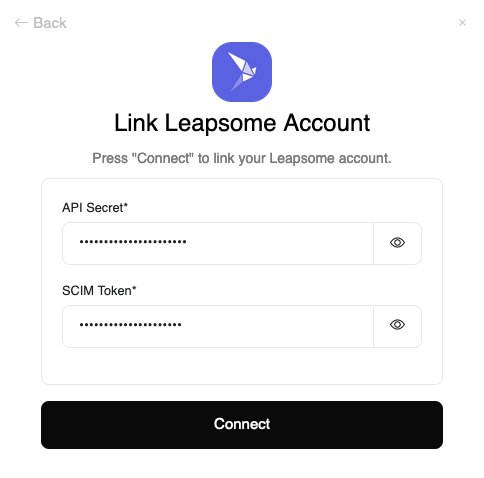
  <Step title="Enter API Secret and SCIM Token">
    Upon reaching the Link Account page, enter the API Secret and SCIM Token from the previous steps.
    <Frame>
      <img className="rounded-md" style={{ margin: '0 auto', border: '1px solid #efefef' }} alt="Link Account" src="https://mintcdn.com/stackone-hub/7ld9431D4vubUUqN/images/leapsome/image8.png?fit=max&auto=format&n=7ld9431D4vubUUqN&q=85&s=3bf5a3b2ba33d3825f7403db2fa68de2" width="484" height="478" data-path="images/leapsome/image8.png" />
    </Frame>
  </Step>

  <Step title="Connect">
    Proceed by clicking the Connect button.
  </Step>
</Steps>

## Available data

This integration has the following [IAM Resources](https://docs.stackone.com/reference/iam_list_users) available from the provider:

<ul>
  <li>Users</li>
  <li>Groups</li>
</ul>
