> ## Documentation Index
> Fetch the complete documentation index at: https://hub.stackone.com/llms.txt
> Use this file to discover all available pages before exploring further.

# Attio

> Follow these steps to connect Attio with StackOne Hub successfully.

<Warning>
  Ensure you have Admin privileges for your Attio account.
</Warning>

If you've been directed to StackOne to integrate with Attio, the following steps will help you understand the process and any necessary actions to configure successful integration.

## Generating an API key

<Steps>
  <Step title="Sign in to Attio">
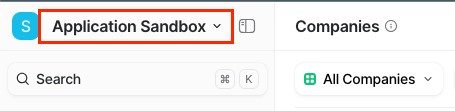
    Sign in to the Attio Dashboard and click on your account name.
    <Frame>
      <img className="rounded-md" style={{ margin: '0 auto', border: '1px solid #efefef' }} alt="Attio Dashboard" src="https://mintcdn.com/stackone-hub/GOZmFSdE5jrwxdYf/images/attio/image1.png?fit=max&auto=format&n=GOZmFSdE5jrwxdYf&q=85&s=24c33827c78c38e283d88c9cbd1ed8a6" width="455" height="111" data-path="images/attio/image1.png" />
    </Frame>
  </Step>

  <Step title="Go to Account settings">
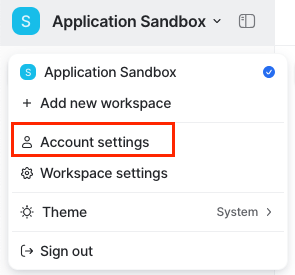
    Click on the Account settings option.

    <Frame>
      <img className="rounded-md" style={{ margin: '0 auto', border: '1px solid #efefef' }} alt="Account settings" src="https://mintcdn.com/stackone-hub/GOZmFSdE5jrwxdYf/images/attio/image2.png?fit=max&auto=format&n=GOZmFSdE5jrwxdYf&q=85&s=f260b54c851bddb2e8b3d3228a4c42b8" width="295" height="275" data-path="images/attio/image2.png" />
    </Frame>
  </Step>

  <Step title="Open Developers settings">
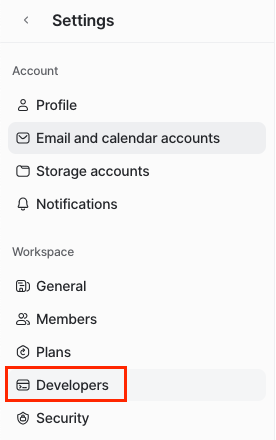
    Inside the Settings page, click on the Developers option.
    <Frame>
      <img className="rounded-md" style={{ margin: '0 auto', border: '1px solid #efefef' }} alt="Developers settings" src="https://mintcdn.com/stackone-hub/GOZmFSdE5jrwxdYf/images/attio/image3.png?fit=max&auto=format&n=GOZmFSdE5jrwxdYf&q=85&s=5e4ee56993d87c68e0220dbb8fcce47f" width="276" height="440" data-path="images/attio/image3.png" />
    </Frame>
  </Step>

  <Step title="Create a new integration">
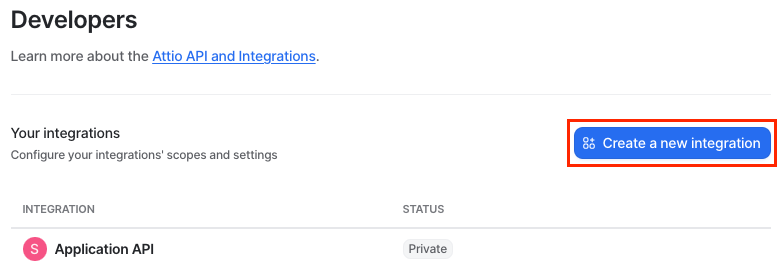
    Click on Create a new integration button.
    <Frame>
      <img className="rounded-md" style={{ margin: '0 auto', border: '1px solid #efefef' }} alt="Create integration" src="https://mintcdn.com/stackone-hub/GOZmFSdE5jrwxdYf/images/attio/image4.png?fit=max&auto=format&n=GOZmFSdE5jrwxdYf&q=85&s=b473fe6b8e6bd7df2bba3aa79e173048" width="780" height="275" data-path="images/attio/image4.png" />
    </Frame>
  </Step>

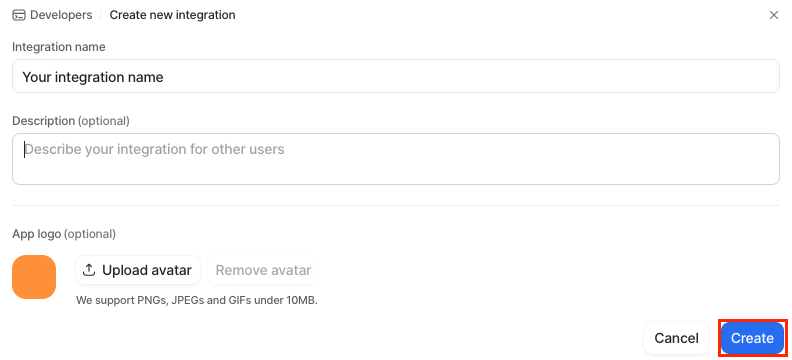
  <Step title="Add integration details">
    Add your integration name and, optionally, description/avatar. Afterward, click Create.
    <Frame>
      <img className="rounded-md" style={{ margin: '0 auto', border: '1px solid #efefef' }} alt="Integration details" src="https://mintcdn.com/stackone-hub/GOZmFSdE5jrwxdYf/images/attio/image5.png?fit=max&auto=format&n=GOZmFSdE5jrwxdYf&q=85&s=b0fa370a7ce2898969bc135c01a33ed8" width="792" height="360" data-path="images/attio/image5.png" />
    </Frame>
  </Step>

  <Step title="Access tokens">
    Once you have successfully created your integration, click on Access tokens option.

    <Frame>
      <img className="rounded-md" style={{ margin: '0 auto', border: '1px solid #efefef' }} alt="Access tokens" src="https://mintcdn.com/stackone-hub/GOZmFSdE5jrwxdYf/images/attio/image6.png?fit=max&auto=format&n=GOZmFSdE5jrwxdYf&q=85&s=3ee51b0a1791f4ab541782f429a984e1" width="773" height="110" data-path="images/attio/image6.png" />
    </Frame>
  </Step>

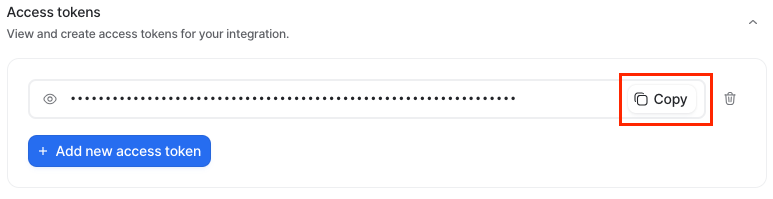
  <Step title="Generate or copy API token">
    You can either generate a new access token (API Key) or copy the existing access token (API Key) for immediate use.
    <Frame>
      <img className="rounded-md" style={{ margin: '0 auto', border: '1px solid #efefef' }} alt="API token" src="https://mintcdn.com/stackone-hub/GOZmFSdE5jrwxdYf/images/attio/image7.png?fit=max&auto=format&n=GOZmFSdE5jrwxdYf&q=85&s=a69d7bf7eea2dc09e1b38a1cb899e971" width="773" height="199" data-path="images/attio/image7.png" />
    </Frame>
  </Step>

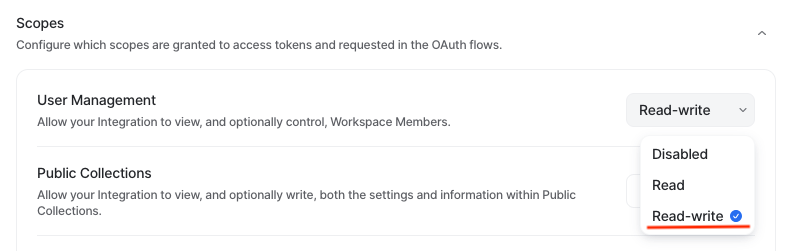
  <Step title="Configure integration scopes">
    Configure the integration scopes by clicking on the Scopes menu and setting the appropriate scope for your work – `Read-write`.
    <Frame>
      <img className="rounded-md" style={{ margin: '0 auto', border: '1px solid #efefef' }} alt="Scopes" src="https://mintcdn.com/stackone-hub/GOZmFSdE5jrwxdYf/images/attio/image8.png?fit=max&auto=format&n=GOZmFSdE5jrwxdYf&q=85&s=d30219ae6ed68201733309a16933631a" width="791" height="251" data-path="images/attio/image8.png" />
    </Frame>
  </Step>
</Steps>

## Connecting with StackOne

<Steps>
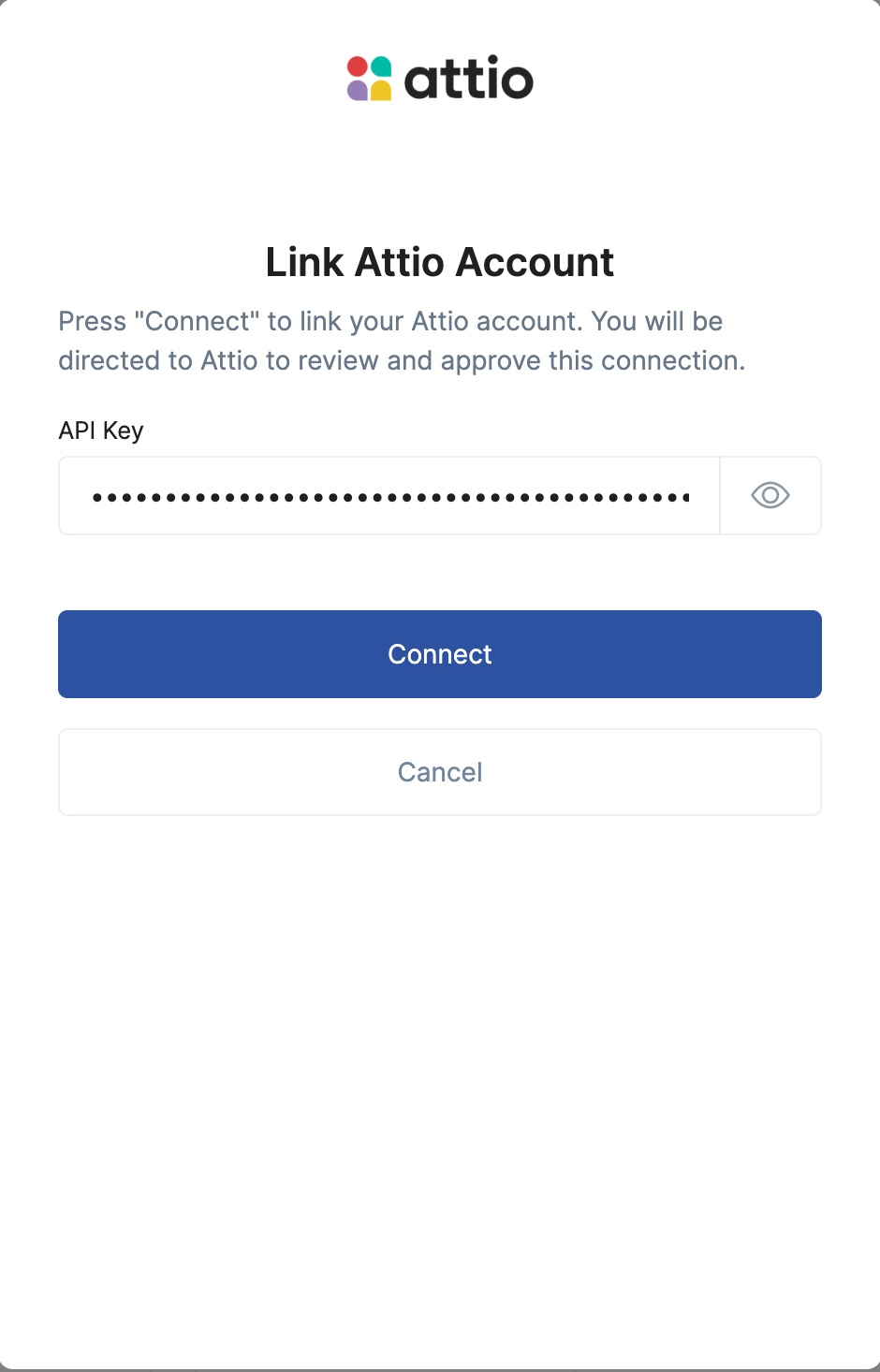
  <Step title="Enter the Details">
    Upon reaching the Link Account page, enter the gathered details and proceed by clicking the `Connect` button.
    <Frame>
      <img className="rounded-md" style={{ margin: '0 auto', border: '1px solid #efefef' }} alt="Link Account" src="https://mintcdn.com/stackone-hub/GOZmFSdE5jrwxdYf/images/attio/image9.png?fit=max&auto=format&n=GOZmFSdE5jrwxdYf&q=85&s=67681567f978ec8f14a4c2776e5952c4" width="940" height="1466" data-path="images/attio/image9.png" />
    </Frame>
  </Step>
</Steps>

## Useful Links

<Card title="API Reference" icon="link" href="https://developers.attio.com/docs/getting-started">
  [https://developers.attio.com/docs/getting-started](https://developers.attio.com/docs/getting-started)
</Card>